
Injectable inventory for iPhone
Botox and filler inventory. Every vial accounted for.
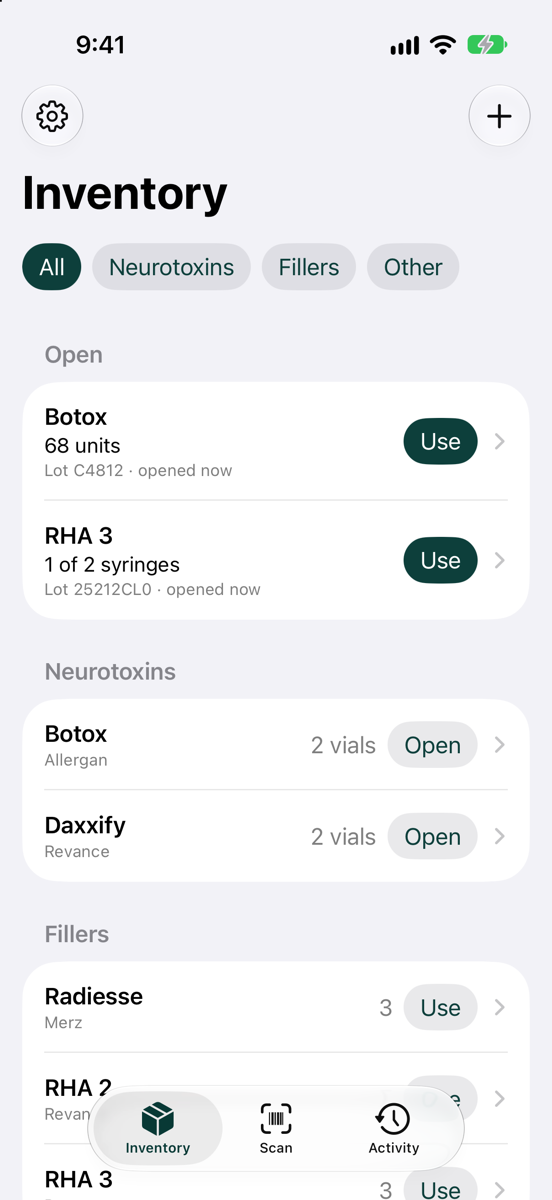
Rastro is an iPhone app for injectors and small practices. Scan toxins and fillers when they arrive, record what you use in seconds, and always know what's open, where it is, and how long it will last.
What it does
Fast enough to use between patients.
Common actions take two or three taps once the app is open. Rastro is built to get out of your way.
Scan to receive
Rastro reads the GS1 and HIBCC barcodes on the box: product, lot, expiration, and serial. Fields fill in when they are encoded in a supported barcode.
How scanning works →Record usage in seconds
One tap for a filler syringe. A number for toxin units. Then you're back with your patient.
Tracking toxin by the unit →Undo instead of “are you sure?”
Routine actions never ask for confirmation. Undo reverses an action when the package history allows it, while keeping the original entry in the history.
Know where stock is
Track inventory at each practice you work at, and move boxes between them.
Rastro for med spas →See how long it will last
Days of supply, worked out from how fast you actually use each product, so you reorder before you run out.
A trail for every package
Received, opened, used, moved, adjusted. Every box and vial keeps its history, filterable by product, lot, location, or date.
Lot and expiration tracking →
How it works
Scan it. Use it. Know it.
Scan it in
When a shipment arrives, scan each box. Product, lot, expiration, and serial fill in when encoded in the barcode.
Record as you go
Open a vial, then log units or a syringe as you use them. Or scan the box and Rastro picks the right package.
Stay ahead
Rastro flags what needs you: packages expiring soon, products running low, and open vials with usage not yet recorded.
Make the numbers useful
How far will your stock take you?
A box count tells you what is on the shelf. Days of supply puts that count in the context of how much you use.
Set your reorder lead time to flag low supply. Track expiration dates separately: days of supply estimates stock coverage, not how long an opened product can be used.
Explore toxin inventory tracking →Who it's for
Made for the people holding the syringe.
Not a practice-management suite, and not an EMR. Just inventory, done well.
Solo injectors
Your stock, on your phone. Know exactly what you have before the day starts.
Injectors who travel
Working across several practices? Keep each site's stock separate and see it all in one place.
Small practices
Keep one shared iPhone in the treatment room, and everyone records into the same inventory.
Private by design
Your inventory stays on your phone.
- No account required. Install it and start scanning.
- Works offline. No signal in the treatment room? It doesn't matter.
- No patient data. Rastro tracks products, never people.
- Your data, exportable. Export everything to CSV whenever you want.
Inventory guides
Start with the stock you manage.
Explore the workflow for your products, from receiving a box to reviewing its history.
Botox and neurotoxins →
Track Botox, Dysport, Xeomin, and other neurotoxins by the unit. Scan vials in, open them, record units in seconds, and see what's left in each vial.
Dermal fillers →
Track dermal filler boxes and syringes by lot and expiration. Scan boxes in, use a syringe in one tap, and finish open boxes before starting new ones.
Lot and expiration tracking →
Know which injectable lots you have, which you used, and when they expire. Rastro records the lot of every package and lets you search history by lot.
Barcode scanning →
Rastro reads GS1 DataMatrix, GS1-128, and HIBCC barcodes on toxin and filler packaging, filling in product, lot, expiration, and serial in one scan.
Med spas and practices →
A simple injectables inventory app for med spas, small practices, and injectors who work at several. Track stock by location, with no account required.
Spreadsheet alternative →
Replace your injectables inventory spreadsheet with an iPhone app that scans barcodes, counts units and syringes, and works out days of supply for you.
Already have practice software?
Keep your EMR. Add Rastro for the vials.
Practice platforms run booking, charting, and billing. Their inventory is often built around retail products. See how each compares with Rastro for injectables.
Before you start
Injectable inventory questions, answered.
What is an injectable inventory app?
An injectable inventory app tracks products such as neurotoxin vials and dermal filler syringes from receipt through use. Rastro records quantities, lots, expiration dates, and locations on your iPhone, with a history for each package.
Can I track Botox by units and fillers by syringes?
Yes. Record the number of units used from an open toxin vial, or record a filler syringe as used. Rastro keeps the remaining quantity with its package and lot.
Does Rastro scan lot numbers and expiration dates?
Rastro reads supported GS1 and HIBCC barcodes and fills in lot, expiration, and serial when those fields are encoded. Missing details can be entered manually. It does not read ordinary printed label text.
How does Rastro estimate days of supply?
Rastro divides stock on hand by your average daily recorded usage, using up to eight weeks of history. Estimates start after at least two weeks of usage history. They help with reorder planning and change as your usage changes.
Can my team share inventory across multiple phones?
Not yet. Rastro keeps inventory on one device and does not sync between phones. A small practice can share one iPhone. Multiple practice locations can be tracked on that device.
Does Rastro work offline, and can I export my inventory?
Yes. Core inventory tracking works offline without an account. You can export inventory and activity to CSV from Settings. Rastro tracks products, not patient records.
Does Rastro replace Jane App, Boulevard, or my EMR?
No. Rastro only tracks injectable inventory, with no patient records, charting, or billing. Keep your practice software for patients and use Rastro for the vials. It doesn't connect to other software.
Is Rastro available on the App Store?
Rastro is coming soon to iPhone. Request early access by email to join the early testers. It is planned to be free, with no account or subscription.
Coming soon
Try Rastro before launch.
Rastro will be free on the App Store, with no account and no subscription. Email us and we'll add you to the early testers.